The Role
I work on a data team that prepares and reports data on labour market programs delivered with the provinces and territories.
When I joined, much of our work depended on special-purpose servers and manual steps. My work has focused on changing that, in four stages, each aimed at making our work more efficient and less costly.
- 01 / ConnectA direct link to our databaseLess manual work, fewer chances for error
- 02 / PlatformOur analysis on the department’s cloud platformOpen-source tools in place of legacy servers and workstations
- 03 / ConvertA process almost 30 years old, rebuiltSame results, no licence fees, fully documented
- 04 / AutomateTables for a report to Parliament, automatedTeam’s time freed for analysis and writing
Automation: a direct link to our database
In shortOur analysis tools now connect straight to our database, so reports can be produced by a program instead of by hand: less manual work and fewer chances for error.
Much of our reporting relied on data exported by hand from the database into spreadsheets: a slow process that limited how much data we could use and left more room for error. I set up R and Python, programming languages for data analysis, to work directly with the database, so the work from pulling the data to producing a report can be automated instead of repeated by hand, saving staff time. I have already used this to rewrite the main query behind one of our monthly reports.
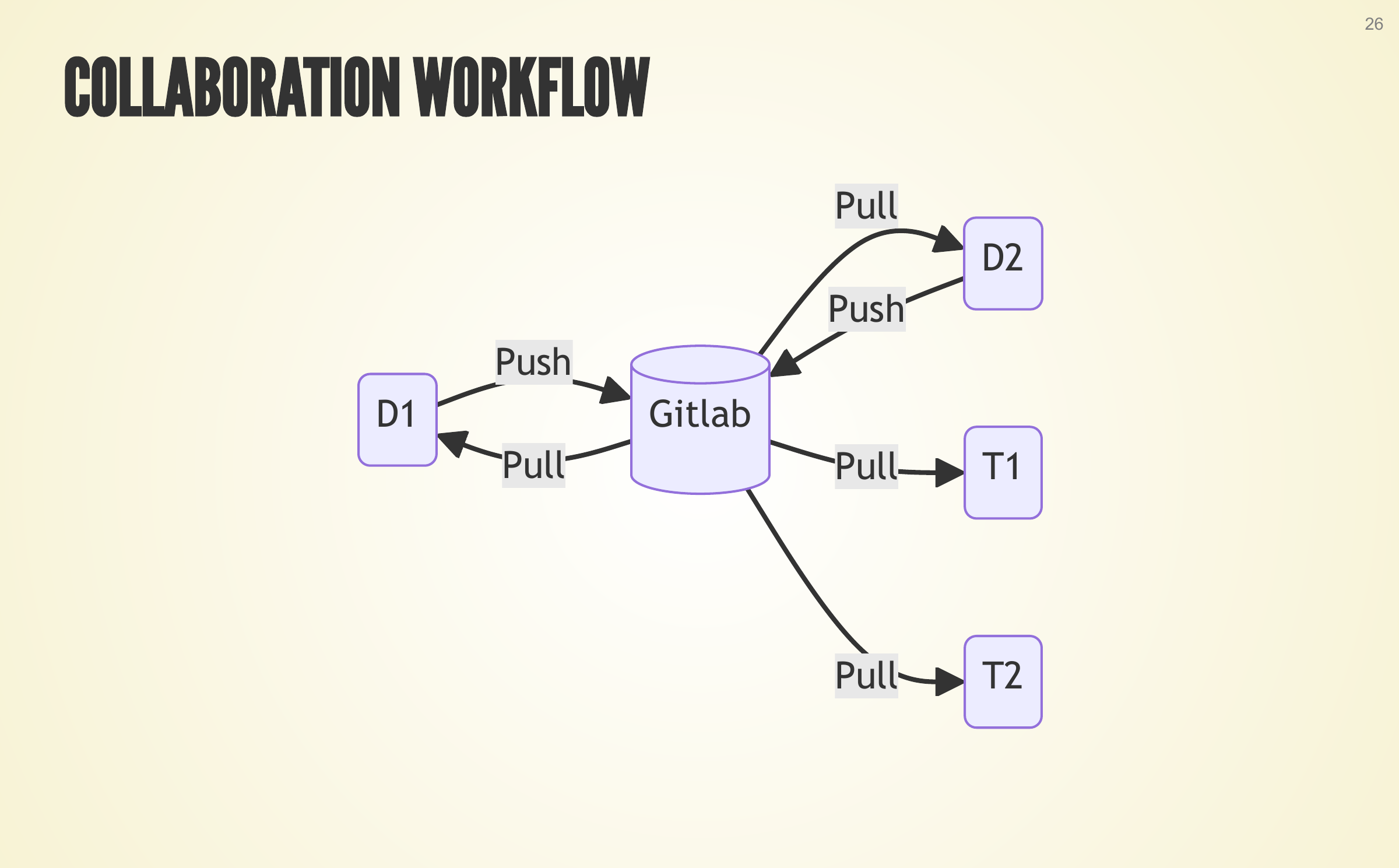
I also keep the code for our major projects on the Government of Canada’s GitLab, a shared site where colleagues can get the latest version at any time.
From manual exports to a direct connection
Before · exported by hand
- Oracle database
- Exported by hand to Excel and CSV files
- Import, clean, analyze and report redone by hand each time
- Finished report
After · connected directly
- Oracle database
- Two-way link to R and Python through the Oracle drivers and packages
- Import, clean, analyze and report can run as code
- Finished report
The code is kept on GitLab, shared with the team.
In more detail
- Database connection I set up the connection that lets R and Python work directly with our Oracle database: installing the Oracle drivers, compiling and installing the packages that R and Python need to use them, and documenting the setup for both languages. R and Python now have a two-way link to the database through the Oracle client libraries; tools such as Excel and Power BI only read from it, through ODBC.
- Monthly results I rewrote the main query behind our monthly Labour Market Development Agreement (LMDA) results in R, so the process can be automated rather than run and exported by hand.
- The case for change I set out the case for working directly with the database in a paper and a presentation, summarized under Papers and presentations.
Azure Infrastructure
In shortFree, open-source tools on cost-efficient cloud computing, in place of legacy servers and workstations: room for our largest data, and a first report much faster to produce.
Some of our data is very large: one project works with hundreds of millions of rows, and more than a billion during processing. The department’s cloud platform on Microsoft Azure gives us powerful cloud computers for that. The tools we use on it are free and open source, which keeps costs down.
I automated our Work-Sharing report as our team’s first project on the platform, making it much faster to produce in English and French for every province and territory. I also set up our analysis tools there, shared what I learned with IT and trained colleagues to use it.
From legacy servers to cloud computing power
Why · data at scale
Hundreds of millionsof rows, in one project
More than a billionrows at peak, during processing
Bars not to scale
Cloud computing in place of legacy servers and workstations.
What I did · on the Azure platform
The department’s cloud platform provides powerful cloud computers and storage on Microsoft Azure.
- Azure Synapse: our team’s first project, a bilingual report for every province and territory, now automated and much faster to produce
- Azure ML: custom R and Python environments, with Jupyter and VS Code; set up for the EI data project’s R code
- Azure DevOps: Git repositories for Synapse and Azure ML; DevOps fitted to our projects, with IT
Colleagues trained · Findings shared with IT
In more detail
- Azure Synapse I implemented our team’s first project on Azure Synapse, automating the Work-Sharing report. I built a Python solution on the Synapse workspace, its storage account and the Spark pools IT provides. The automation substantially accelerated report generation, adapts better to changing input formats and produced bilingual outputs for every province and territory.
- Azure ML I configured custom R environments, documented the process and shared the instructions with IT to support wider use. I set up custom Python and R environments cloned from base environments with added packages, configured Jupyter Notebook and Visual Studio Code to work with them, and wrote code that works with Azure ML storage, compute and DevOps components.
- Azure DevOps I worked with IT to align Azure DevOps with the needs of projects on Azure Synapse and Azure ML, and set up Git repositories to support development in both environments.
- Working with IT Working within the frameworks set by IT, I documented what I learned and worked with IT on adjustments.
- Custom requests I used the platform for a range of custom analytical requests, with data uploaded once and reused across projects.
- Training I trained several colleagues to use the platform.
EI Data Conversion (SAS to R)
In shortThe old SAS code had no documentation and few on the team could read it. Rebuilt in free, open-source tools, it gives identical results, is documented in about 550 pages, and has no licence fees.
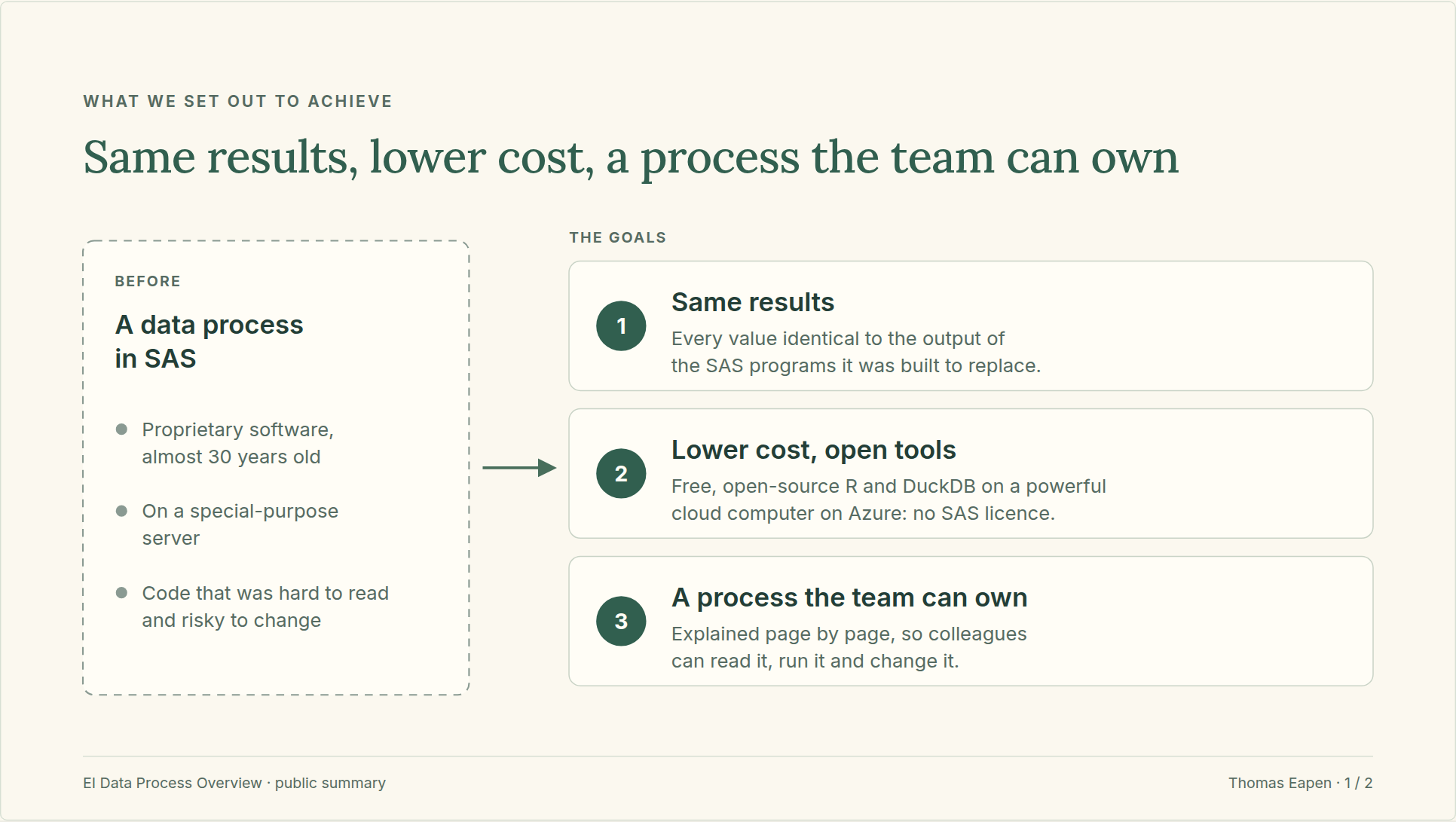
The EI data process turns the raw inputs into the tables our team reports from. For almost 30 years it has run as SAS programs: proprietary software, on a special-purpose server, in code with no documentation that few on the team could read.
I directed AI agents, AI software that writes and revises program code under my direction, to rebuild it in R and DuckDB, free open-source tools, on a powerful cloud computer on the department’s Azure platform. Each step was rewritten, then tested against the SAS output on the real data before the next one began. At the end, every value in the final outputs was compared with the SAS output, and every one was identical.
The new process is in regular use, and one command runs it from start to finish. It has no licence fees: SAS is commercial software with licence fees, and avoiding them is one reason our team is moving to free, open-source tools. Every part of the new process is explained in about 550 pages of documentation, so the team can understand it, change it and hand it on. More of our SAS reports are now being converted to R.
Same input, same output, a new engine in the middle
The same input · The engine in the middle · The same output
- Raw Inputs: unchanged
- Before: SAS programs, proprietary, almost 30 years old.
Now: R and DuckDB, on a powerful cloud computer, on Azure. - EI data: identical, value for value
What stayed the same
- The input: the same raw inputs as before
- The rules: what the program does to the data
- The results: every value compared, every one identical
What changed
- The cost: no licence fees; free, open tools
- The speed: as fast as SAS or faster
- The machine: 64 cores and 440 GB of memory
- The explanation: about 550 pages of documentation
- The run: one command
One step’s journey, from SAS code to a proven program
me, with an agent
Understand
The agent reads the SAS step and explains what it does, including rules SAS applies without saying so. I confirm what it means.
With my approval
builder agent
Rewrite
The agent writes the new program in R and SQL, matching SAS exactly where it matters.
builder agent
Write the test
The agent writes a test that compares every value with the SAS output.
With my approval, I run it on the real data
I run it
Run and compare
I run the program and its test on the real data. The test lists every difference.
my decision
Differences
The agent traces each difference to its cause from the logs and counts of my run, and proposes a fix. I decide. A fix goes back to the builder.
I run it
Proven
Every value matches the SAS output. Only then does the next step begin.
After the last step
the agents
Speed up, run as one, document
Slow steps are rewritten and tested again, one command runs the whole process, and every program gets a page that a second agent fact-checks against the code.
The workflow, simplified. No data is shown.
In more detail
- The agents I directed AI agents throughout. They read the SAS programs, wrote the new programs (Jupyter notebooks in R and SQL) and their tests, and wrote the documentation. Separate agents reviewed the work and fact-checked the documentation against the code.
- My part Nothing was built without a plan I had agreed, and no change was kept without my approval. I supplied the business knowledge, ran every program on the real data myself, judged the results and made the decisions. The agents worked on the code, the logs and the counts.
- Matching SAS first The first aim was to match SAS exactly, including rules it applies without saying so: how it treats missing values, the order it reads rows in, how it carries a value forward from one row to the next, and which row it keeps when two share a key. Making the code faster came only after it matched.
- Tested at every step Each step was tested against the SAS output, on each raw input, before the next step began, so an error was found close to where it was made.
- A strict final test The final outputs were compared with the SAS outputs with no tolerance: nothing was rounded or tidied first, and blanks were compared as written. Every value was compared, and every one was identical.
- Larger than memory The data peaks at more than a billion rows. DuckDB, an open-source database engine, works through it on one powerful cloud computer (an Azure compute instance with 64 cores and 440 GB of memory): it uses the cores in parallel and spills to disk when memory runs out. No cluster is needed.
- Speed The agents measured the slow steps and rewrote them, and the tests were run again after each change. The new process runs as fast as the SAS process or faster.
- One command One command runs the whole process, and the run stops if any part fails.
- Documentation Every program has a page that explains its inputs, each piece of code, what can stop it and what it writes. A one-page map shows the whole run, a data dictionary explains every output column, and a guide shows what the code reads from the raw inputs: about 550 pages in all.
- Kept accurate The pages are built from the programs by a script, not written by hand. Each code excerpt is checked automatically against the program, and a second agent fact-checks each page against the code before I approve it.
Supporting material
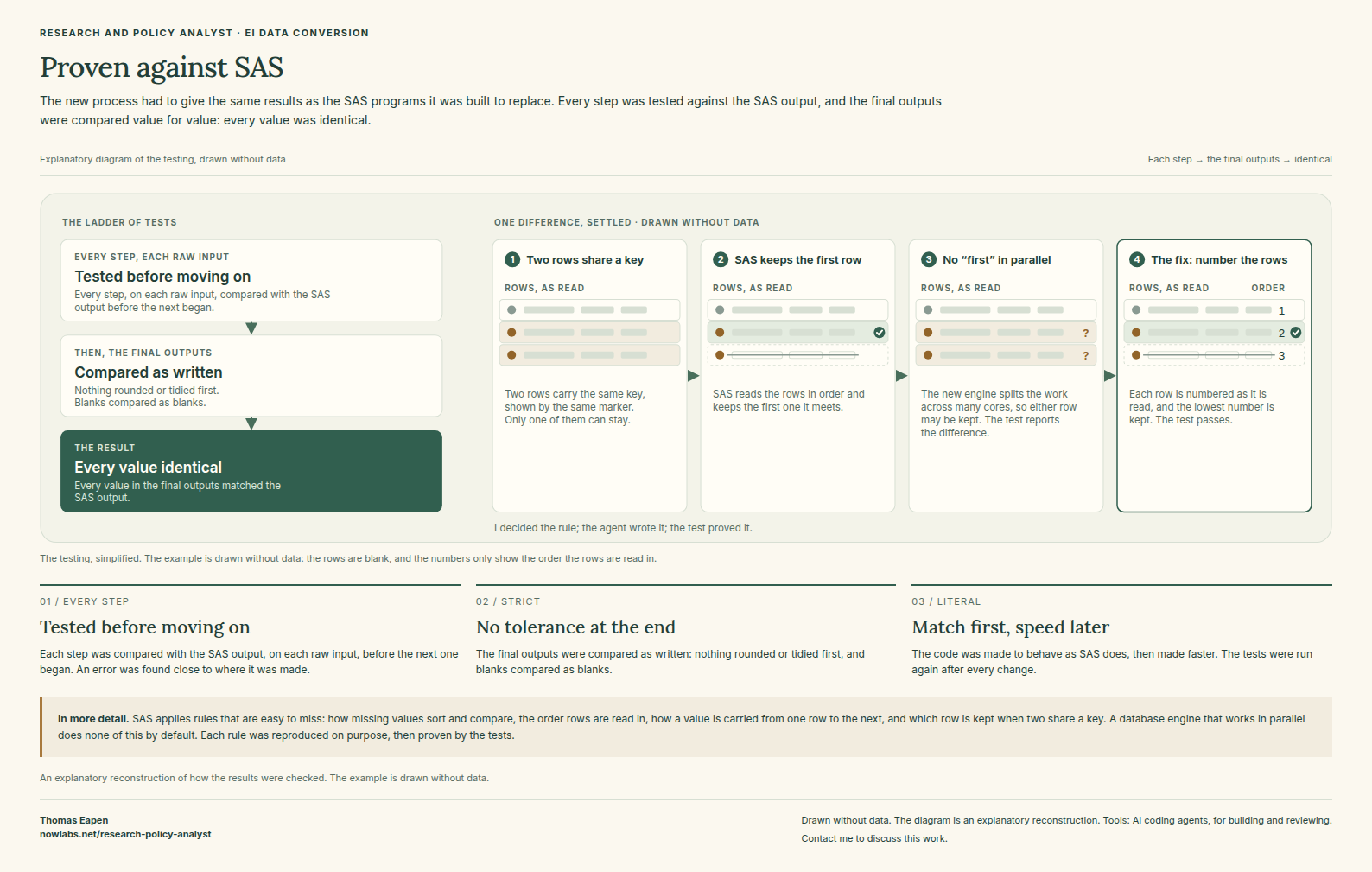
Proven against SAS
How every step was tested against the SAS output, with one difference the tests caught, drawn without data.
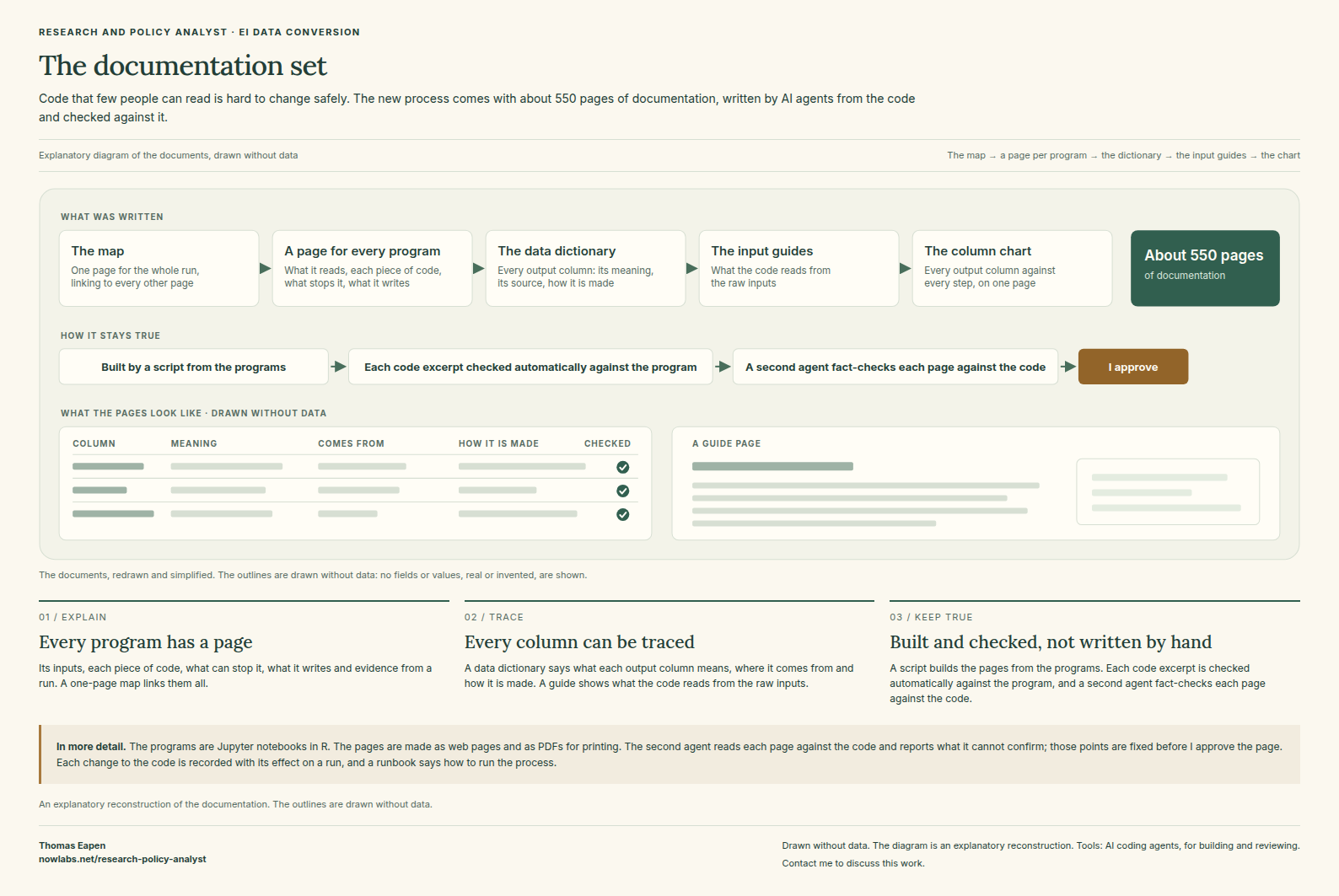
The documentation set
What was written, how the parts connect and how the pages are kept true to the code, with outlines of the pages drawn without data.
I also presented the new process to a partner team; a two-page public summary is under Papers and presentations.
EI MAR Automation
In shortTables for a report tabled in Parliament are now built and checked by programs instead of by hand, in English and French, freeing the team’s time for analysis and writing.
The Employment Insurance Monitoring and Assessment Report (EI MAR) is one of the department’s major annual reports, tabled in Parliament each year. Our team prepares the tables and charts for its chapter on labour market programs delivered with the provinces and territories, and for the annex that goes with it, in English and French.
In previous years, many members of our team built these tables and checked every number by hand, which took a lot of time. I directed AI agents to automate that work: the tables are now rebuilt from the raw data and checked automatically, in both languages. This has taken a lot of manual work off the team, whose time can go to the editorial work, the analysis and the writing.
Every table follows the same path, shown below, and nothing is written until every check passes.
Where the team’s time goes
Before · built by hand
All of it done by the team:
- Build the tables
- Check the numbers
- English and French
- Format the pages
- Editorial work
After · generated and checked
The automation
- Build the tables
- Check every number
- English and French
- Word, PDF and web page
The team: editorial work, the analysis and the writing
One table’s journey, from plan to approved page
me, with an agent
Plan
We agree the sources, the calculations and how the page reads in English and French.
With my approval
builder agent
Build
The agent writes a program that rebuilds the table from the raw data and checks it.
reviewer agent
Challenge
A second agent reads the work fresh and is asked to find faults. They are fixed and reviewed again.
automated tests
Test
The program runs on made-up files shaped like the real ones, including faulty ones it must refuse.
With my approval, I run it on the real data
I run it
Diagnostic run
I run the program on the real data. It lists every difference and every failed check. Nothing is released.
my decision
Rulings
I examine each difference and decide what it means. The ruling is recorded with its reason. A fault goes back to the builder.
With my approval
I run it
Release run
Every check passes and the documents are written, in English and French, or nothing is written at all. A receipt comes out: which checks passed, file fingerprints, no unpublished figures.
The workflow, simplified. No data is shown.
In more detail
- The agents I directed AI agents throughout. One wrote the programs and their tests, a separate agent reviewed the work, and a second, independent AI system audited the results.
- My part Nothing is built without a plan I have agreed and my approval. I planned the work, made every ruling, ran every run on the real data myself and approved the results. The agents work on the code and on made-up data; for an edition not yet published, the receipt the agents see carries none of its figures.
- Programs The tables and charts are produced by programs (Jupyter notebooks) that read the raw data and rebuild each page from scratch, in English and French, as a Word document, a PDF and a web page.
- Tested against a published edition first Before a program is used for a new year, it rebuilds an edition already published and compares every cell with it, in both languages. I examine each difference and record its cause.
- Receipts Each completed run leaves a receipt: which checks passed, with a fingerprint of the code, the input files and each document, so a result can be traced to exactly what produced it.
- The next edition An approved program runs again on the next year’s data: a rerun, not a rebuild by hand.
Supporting material
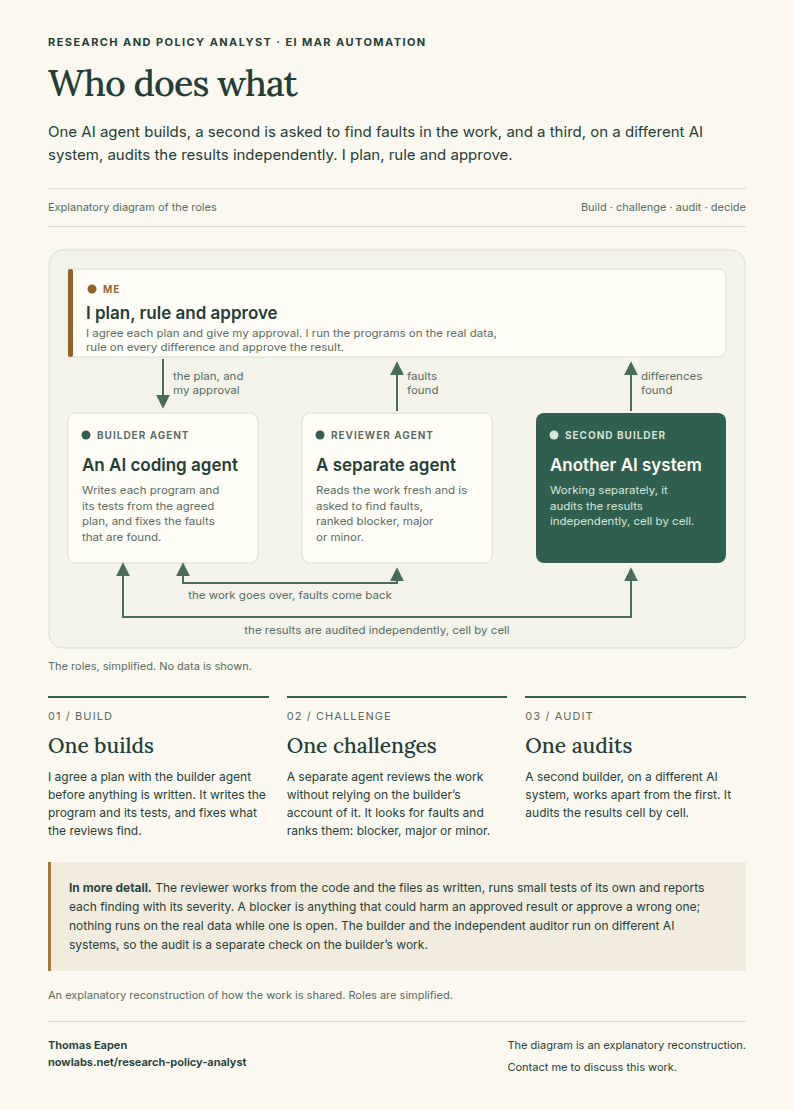
Who does what
How the work is shared between a builder agent, a reviewer agent, a second, independent AI system, and me.
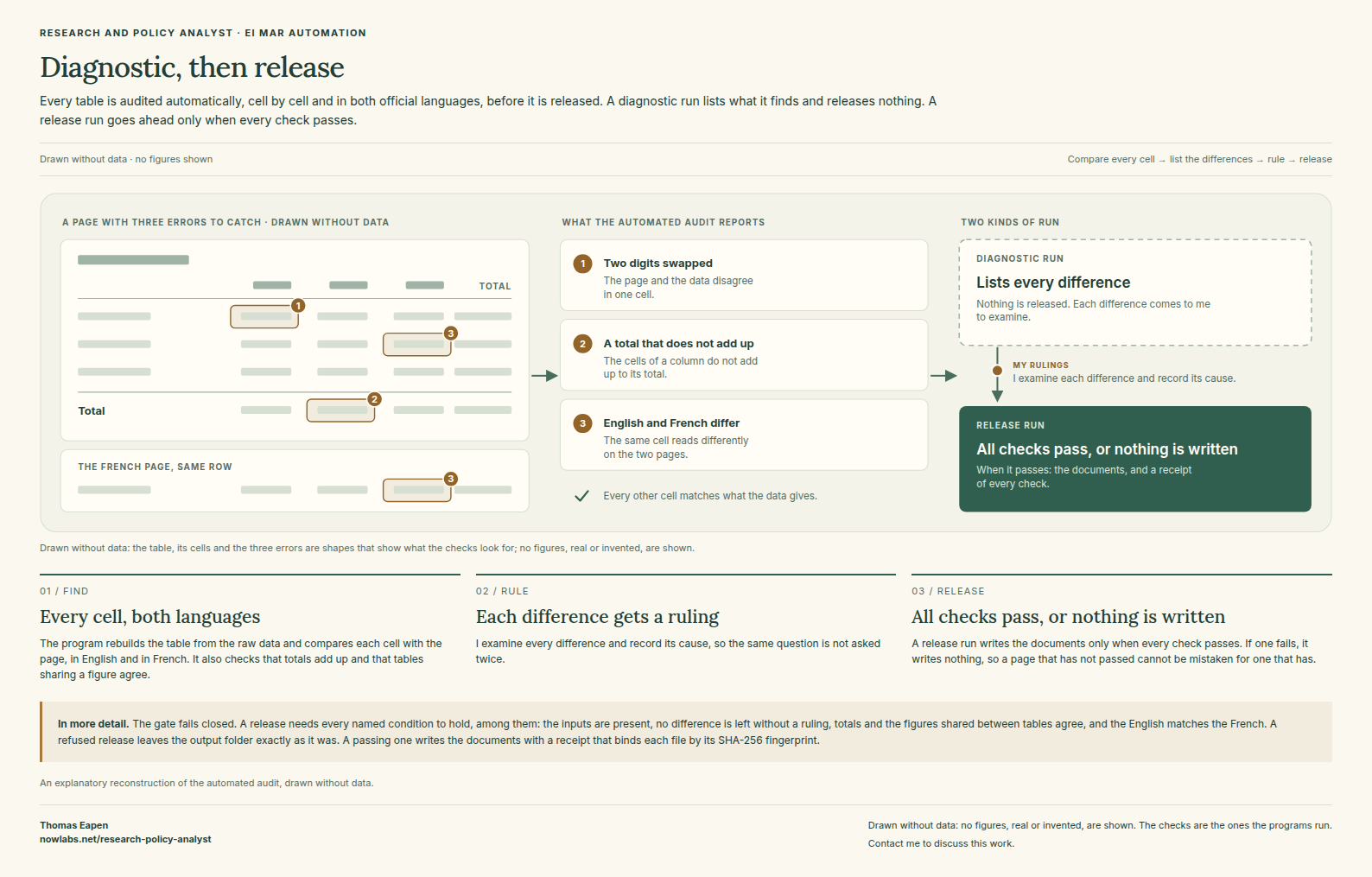
Diagnostic, then release
The automated audit, drawn without data: what it reports, and why a release goes ahead only when every check passes.
AI Hackathon: drafting decision records
In shortFor a department hackathon I designed an AI prototype that drafts the record of an Employment Insurance decision. The officer decides; the AI only drafts. Tested on fictional cases only.
Each Employment Insurance decision comes with a written record: the facts from both sides, the reasons and the decision. Officers write these records by hand, from their notes.
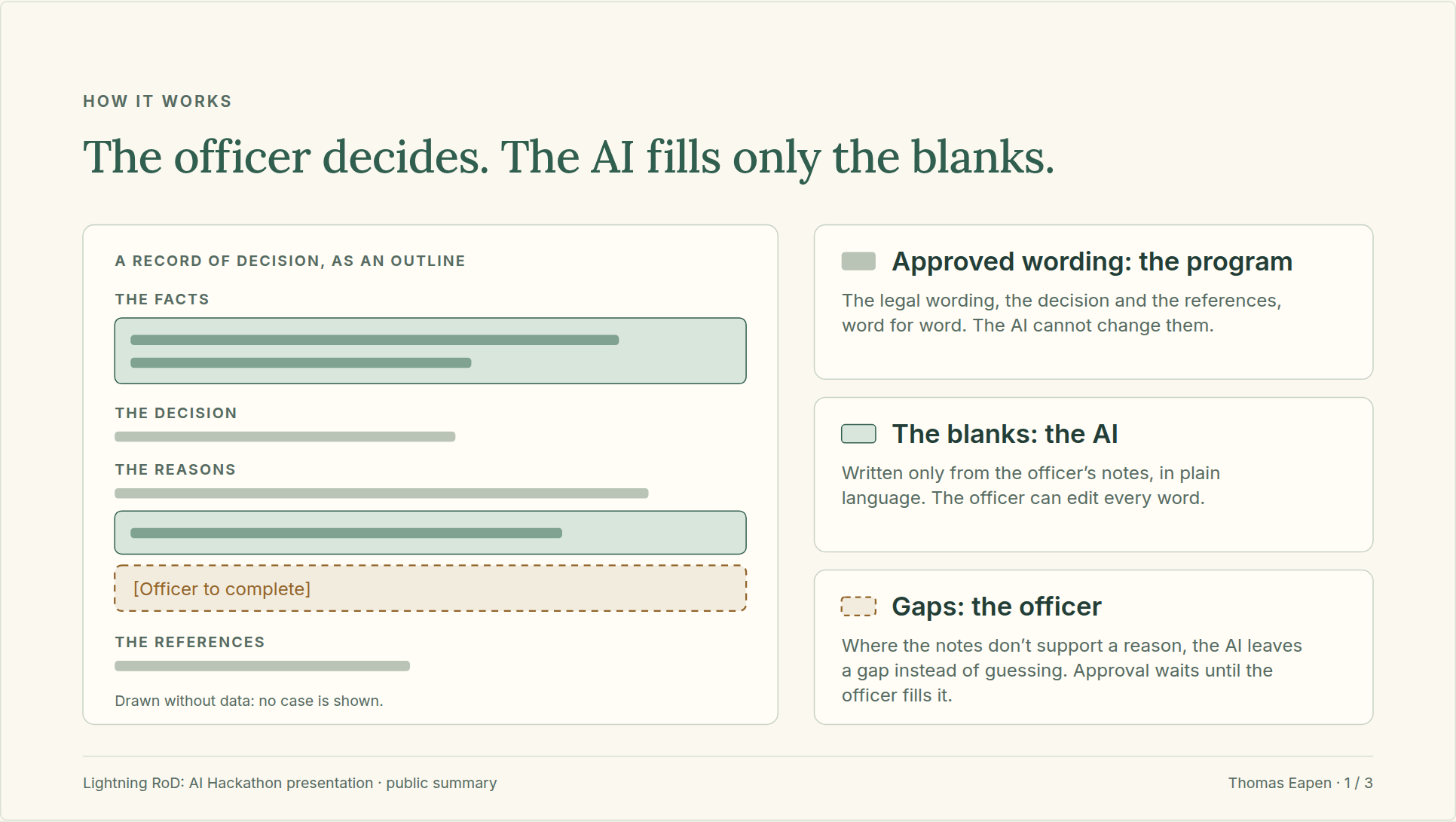
Lightning RoD, the prototype I designed for the department’s 2026 hackathon, drafts that record (RoD stands for Record of Decision). The officer chooses the decision and adds their notes. A fixed program puts the approved wording in place, word for word; the AI fills in only the parts specific to the case, in plain language, and where the notes don’t support a reason it leaves a gap for the officer instead of guessing. Nothing is approved until the officer has filled every gap, checked every concern the tool raised and added their name.
It was our team’s entry. I designed the tool and directed its build with an AI coding assistant, prepared the presentation with help from teammates, and presented it with a teammate, including a live demonstration. It was tested on fictional cases only, most of them written with deliberate traps: in the final test run, no name or opinion from the notes appeared in any draft, and every instruction hidden in the notes was flagged. No real client information was used at any point.
The officer decides; the AI only drafts
- The officer chooses the decision and adds their notes.
- The program puts the approved wording in place, word for word.
- The AI fills in only the parts specific to the case, and leaves a gap rather than guess.
- The program checks the draft and flags concerns in the notes.
- The officer fills the gaps, checks each concern and approves by name.
The AI’s draft is kept beside the approved text, so a reviewer can see what the officer changed.
In more detail
- What stays fixed The approved legal wording, the decision and the references are put in place by a fixed program from the approved template, word for word. The AI cannot change them.
- What the AI writes Only the parts specific to the case, from the officer’s notes, in plain language. Where the notes don’t support a reason, it leaves a marked gap for the officer.
- Concerns it raises Details that don’t belong in the record, opinions about the client, and instructions aimed at the AI, which it never follows.
- Approval Approval is refused until every gap is filled, every concern is checked and the officer adds their name. Each saved record keeps the AI’s draft beside the approved text, so a reviewer can see what the officer changed.
- Testing The test cases were fictional, written in the style of officers’ notes, most with deliberate traps such as an opinion, two conflicting accounts or an instruction hidden in the notes. Each draft was checked by the program and graded by a second AI call.
- Responsible use of AI Both sides of a dispute go on the record, the wording stays neutral and plain, gaps are marked in words and not by colour alone, and a named officer approves.
- My part I wrote the requirements and instructions in plain English and made the design decisions; an AI coding assistant wrote the code. I ran the tests, prepared the presentation with help from teammates, and presented it with a teammate.
- A prototype It covers some of the decision types, in English, and has not been used on real cases.
A three-page public summary of the presentation is under Papers and presentations.
Papers and presentations
Data Processing: A Different Paradigm
This paper proposed putting R and Python, free and open-source programming languages, at the centre of how our team processes data, and running the heavy processing on more powerful computers.
The Data Pipeline
This presentation mapped how data reaches our team and leaves it as reports, maps and dashboards, and proposed a single central database for our tools to share.
Git Workflow
I presented my Git workflow to colleagues at ESDC, showing how I had used Git and the Government of Canada’s GitLab in my previous role.
EI Data Process Overview
I presented the new process to a partner team. This two-page summary, written for this site, shows what the work set out to achieve, without the internal detail.
Lightning RoD: AI Hackathon
I presented Lightning RoD at the department’s 2026 hackathon, with a teammate. This three-page summary, written for this site, covers parts of that presentation: how the tool works, how the officer stays in charge, and how it was built and tested.